
 Arushi Sachdeva
The Battleships Game
If you haven't heard of it before, "Battleships" is a game played on a grid of coordinates, with a cross marking each square.
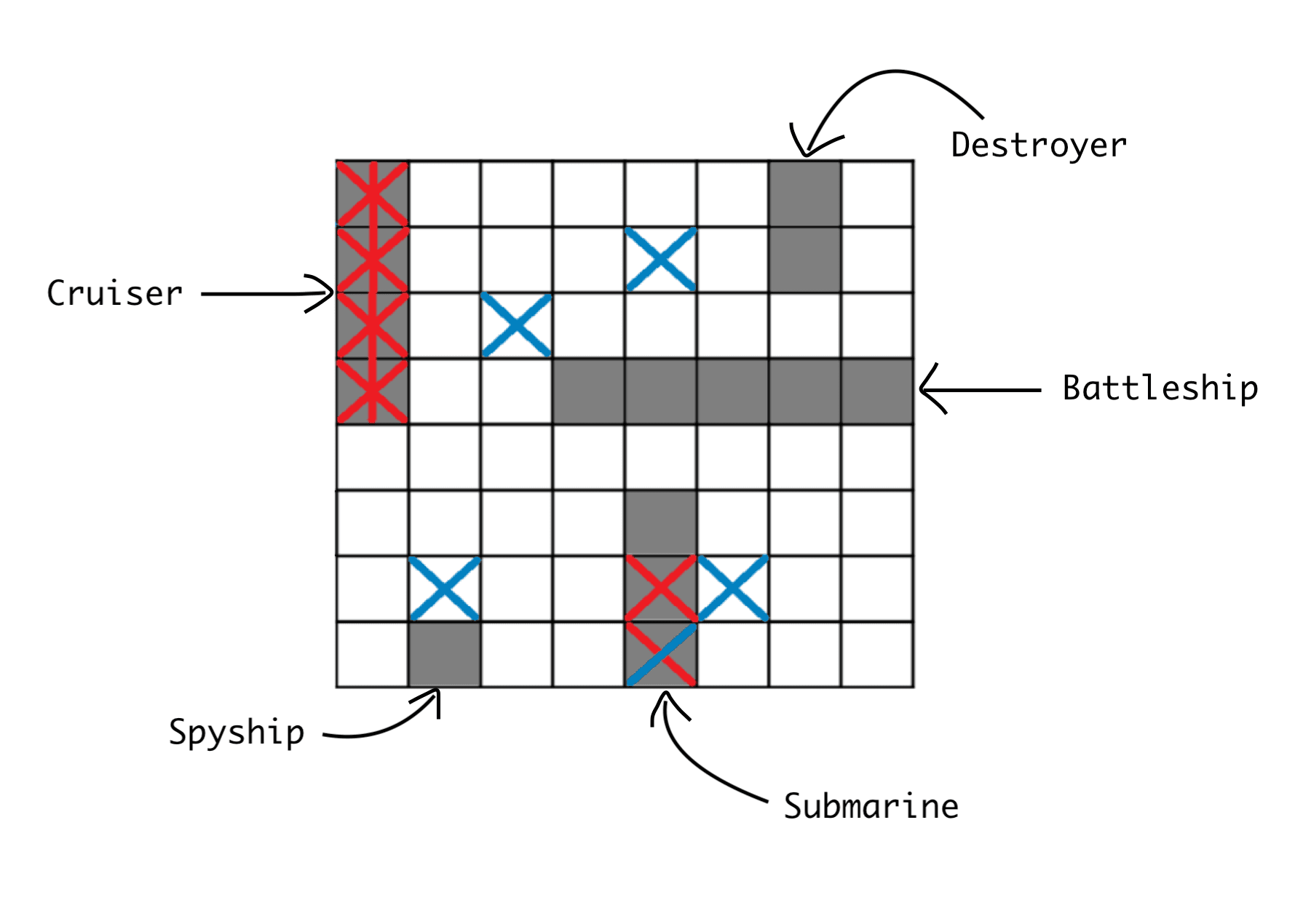
Hidden at some of these coordinates are ships - battleships, cruisers, submarines, destroyers and spyships - and each of them has a different length: 5, 4, 3, 2 and 1 squares on the grid respectively.
Essentially, you choose one of the coordinates at random to begin with. If you hit a ship, you get a point - and since each ship lies entirely within one row or column, a hit tells you where to aim next, so you can keep guessing the squares around it to sink the whole ship. The game ends when you run out of guesses. If that didn't make sense, the image below should help:
Now, decomposing the problem:
- Global variables
- Subprograms
- Outputting the board
- Introduction
- Organising the ships
- Checking the state
- Putting it all together
Global Variables
Our board will consist of an 8×8 grid, so we need to make a 2D array for it and label the columns and rows so that it is easier for the user. On top of this we need to have a "hidden board" that contains the actual positions of the ships so that we can compare the user's input to this actual board - of course in the real game this would never be outputted to the user because that would defeat the point.
# Define the 2D arrays 'board' and 'hidden_board'
row = ["*", "*", "*", "*", "*", "*", "*", "*"]
board = [row[:] for x in range(8)]
hidden_board = copy.deepcopy(board) # So the arrays don't indicate the same memory location.# Define the 2D arrays 'board' and 'hidden_board'
row = ["*", "*", "*", "*", "*", "*", "*", "*"]
board = [row[:] for x in range(8)]
hidden_board = copy.deepcopy(board) # So the arrays don't indicate the same memory location.Our user's variables will also be global so that we can update them as the program goes on - this would be the user's score and how many guesses they have left (there should be a limit to how many moves the user can make).
# User variables
user_score = 0
guesses_left = 15# User variables
user_score = 0
guesses_left = 15After this we need 2 more global variables: a dictionary which states whether or not there are any ships for each type remaining, and a list containing "up" and "down" for when we distribute the ships later on.
ship_dict = {"battleship": True, "cruiser": True, "submarine": True, "destroyer": True, "spyships": True}
up_down = ["up", "down"] # Used for choosing where the ships will beship_dict = {"battleship": True, "cruiser": True, "submarine": True, "destroyer": True, "spyships": True}
up_down = ["up", "down"] # Used for choosing where the ships will beSubprograms
Outputting the Board
We would essentially use a for loop and iterate through our 2D array, but since we also need to label the rows and columns, we add in two more local variables 'x' and 'count' that help with this. If it's not already obvious, the output shows what the board looks like.
def print_board():
    count = 0
    x = 0
    for item in board:
        if count == 0:
            print("  0 1 2 3 4 5 6 7")
        count = 1  # so the column numbers are only printed out once.
        print(x, end=' ')
        for value in item:
            print(value, end=' ')
        x = x + 1  # increments the row numbers by 1 each time.
print("")0 1 2 3 4 5 6 7 0 * * * * * * * * 1 * * * * * * * * 2 * * * * * * * * 3 * * * * * * * * 4 * * * * * * * * 5 * * * * * * * * 6 * * * * * * * * 7 * * * * * * * *
def print_board():
    count = 0
    x = 0
    for item in board:
        if count == 0:
            print("  0 1 2 3 4 5 6 7")
        count = 1  # so the column numbers are only printed out once.
        print(x, end=' ')
        for value in item:
            print(value, end=' ')
        x = x + 1  # increments the row numbers by 1 each time.
print("")0 1 2 3 4 5 6 7 0 * * * * * * * * 1 * * * * * * * * 2 * * * * * * * * 3 * * * * * * * * 4 * * * * * * * * 5 * * * * * * * * 6 * * * * * * * * 7 * * * * * * * *
Introduction
This will be a small introduction to the user which says how the game works, after which we would print out the board.
def introduction():
    print("Welcome to Battleships!")
    print("In this game, you need to guess as many of the locations of my ships as you can!")
    print("A battle ship takes up 5 spaces, a cruiser takes up 4 spaces, a submarine takes up 3 spaces, and a destroyer"
        + "\ntakes up 2 spaces. There's also 4 spy ships, disguised as fishing boats, each taking up 1 space.")
    print("Each time I'll show you the board and you need to type in the column number and the row number of the space "
        + "\nwhere you want to hit.")
    print("For every hit you land, you get 1 point.\nYou have 15 tries - good luck!")
print_board()def introduction():
print("Welcome to Battleships!")
print("In this game, you need to guess as many of the locations of my ships as you can!")
print("A battle ship takes up 5 spaces, a cruiser takes up 4 spaces, a submarine takes up 3 spaces, and a destroyer"
+ "\ntakes up 2 spaces. There's also 4 spy ships, disguised as fishing boats, each taking up 1 space.")
print("Each time I'll show you the board and you need to type in the column number and the row number of the space "
+ "\nwhere you want to hit.")
print("For every hit you land, you get 1 point.\nYou have 15 tries - good luck!")
print_board()Organising the Ships
Since battleships take up 5 squares, we'll position the battleship first. The battleship can either be vertical or horizontal, so we assign a random variable 'z' which is either 'up' or 'down'. Then we would choose a starting square using the random numbers 'x' and 'y' which should ensure that the battleship is in a different position every time the game restarts.
Because no ships have been assigned yet, we can straight away assign the battleship to these coordinates.
def choose_ships():
    # Create Battleships
    # Intialises variables and stores random numbers in them.
    x = random.randint(0, 3)
    y = random.randint(0, 3)
    z = random.choice(up_down)  # z is an item that has been chosen from the list up_down (see top).
    if z == "up":
        hidden_board[x][y] = "B"
        hidden_board[x + 1][y] = "B"
        hidden_board[x + 2][y] = "B"
        hidden_board[x + 3][y] = "B"
        hidden_board[x + 4][y] = "B"
    elif z == "down":
hidden_board[x][y:y + 4] = ["B", "B", "B", "B", "B"]def choose_ships():
# Create Battleships
# Intialises variables and stores random numbers in them.
x = random.randint(0, 3)
y = random.randint(0, 3)
z = random.choice(up_down) # z is an item that has been chosen from the list up_down (see top).
if z == "up":
hidden_board[x][y] = "B"
hidden_board[x + 1][y] = "B"
hidden_board[x + 2][y] = "B"
hidden_board[x + 3][y] = "B"
hidden_board[x + 4][y] = "B"
elif z == "down":
hidden_board[x][y:y + 4] = ["B", "B", "B", "B", "B"]Now a cruiser takes up 4 squares, but we have the issue of the battleship taking up some squares, so we need to use a while loop that keeps running until the program meets some free squares. The code is similar to before, but this time x and y can be 4, and we add an additional if statement that checks whether any of the squares are already occupied.
   # Create Cruiser
    while True:
        z = random.choice(up_down)
        y = random.randint(0, 4)
        x = random.randint(0, 4)
        if z == "up":
            if hidden_board[x][y] != '*' or hidden_board[x + 1][y] != '*' or hidden_board[x + 2][y] != '*' or                     hidden_board[x + 3][y] != '*':
                continue
            else:
                hidden_board[x][y] = "C"
                hidden_board[x + 1][y] = "C"
                hidden_board[x + 2][y] = "C"
                hidden_board[x + 3][y] = "C"
                break
        elif z == "down":
            if hidden_board[x][y] != '*' or hidden_board[x][y + 1] != '*' or hidden_board[x][y + 2] != '*' or                     hidden_board[x][y + 3] != '*':
                continue
            else:
                hidden_board[x][y:y + 3] = ["C", "C", "C", "C"]
break # Create Cruiser
while True:
z = random.choice(up_down)
y = random.randint(0, 4)
x = random.randint(0, 4)
if z == "up":
if hidden_board[x][y] != '*' or hidden_board[x + 1][y] != '*' or hidden_board[x + 2][y] != '*' or hidden_board[x + 3][y] != '*':
continue
else:
hidden_board[x][y] = "C"
hidden_board[x + 1][y] = "C"
hidden_board[x + 2][y] = "C"
hidden_board[x + 3][y] = "C"
break
elif z == "down":
if hidden_board[x][y] != '*' or hidden_board[x][y + 1] != '*' or hidden_board[x][y + 2] != '*' or hidden_board[x][y + 3] != '*':
continue
else:
hidden_board[x][y:y + 3] = ["C", "C", "C", "C"]
breakThe code is similar for the submarine, destroyer and spyships, since all we need to do is reduce the number of squares we check and increase the range that x and y can be within.
    # Create submarine
    while True:
        z = random.choice(up_down)
        y = random.randint(0, 5)
        x = random.randint(0, 5)
        if z == "up":
            if hidden_board[x][y] != '*' or hidden_board[x + 1][y] != '*' or hidden_board[x + 2][y] != '*':
                continue
            else:
                hidden_board[x][y] = 'S'
                hidden_board[x + 1][y] = 'S'
                hidden_board[x + 2][y] = 'S'
                break
        elif z == "down":
            if hidden_board[x][y] != '*' or hidden_board[x][y + 1] != '*' or hidden_board[x][y + 2] != '*':
                continue
            else:
                hidden_board[x][y:y + 2] = ["S", "S", "S"]
                break
    # Create destroyer
    while True:
        z = random.choice(up_down)
        # Intialises variables and stores random numbers in them.
        y = random.randint(0, 6)
        x = random.randint(0, 6)
        if z == "up":
            if hidden_board[x][y] != '*' or hidden_board[x + 1][y] != '*':
                continue
            else:
                hidden_board[x][y] = 'D'
                hidden_board[x + 1][y] = 'D'
                break
        elif z == "down":
            if hidden_board[x][y] != '*' or hidden_board[x][y + 1] != '*':
                continue
            else:
                hidden_board[x][y:y + 1] = ["D", "D"]
                break
    # Create Spyships (Fishing boats, so we'll use F)
    ship_number = 0
    while ship_number < 4:
        y = random.randint(0, 7)
        x = random.randint(0, 7)
        if hidden_board[x][y] != '*':
            continue
        else:
            ship_number += 1
hidden_board[x][y] = 'F' # Create submarine
while True:
z = random.choice(up_down)
y = random.randint(0, 5)
x = random.randint(0, 5)
if z == "up":
if hidden_board[x][y] != '*' or hidden_board[x + 1][y] != '*' or hidden_board[x + 2][y] != '*':
continue
else:
hidden_board[x][y] = 'S'
hidden_board[x + 1][y] = 'S'
hidden_board[x + 2][y] = 'S'
break
elif z == "down":
if hidden_board[x][y] != '*' or hidden_board[x][y + 1] != '*' or hidden_board[x][y + 2] != '*':
continue
else:
hidden_board[x][y:y + 2] = ["S", "S", "S"]
break
# Create destroyer
while True:
z = random.choice(up_down)
# Intialises variables and stores random numbers in them.
y = random.randint(0, 6)
x = random.randint(0, 6)
if z == "up":
if hidden_board[x][y] != '*' or hidden_board[x + 1][y] != '*':
continue
else:
hidden_board[x][y] = 'D'
hidden_board[x + 1][y] = 'D'
break
elif z == "down":
if hidden_board[x][y] != '*' or hidden_board[x][y + 1] != '*':
continue
else:
hidden_board[x][y:y + 1] = ["D", "D"]
break
# Create Spyships (Fishing boats, so we'll use F)
ship_number = 0
while ship_number < 4:
y = random.randint(0, 7)
x = random.randint(0, 7)
if hidden_board[x][y] != '*':
continue
else:
ship_number += 1
hidden_board[x][y] = 'F'Now we've successfully positioned our battleships.
Checking the State
When the game starts, the user needs to input the column and row number they are hitting, so we can call their inputs "user_col" and "user_row" respectively. Naturally, we will also need to access the global user variables. As a start, we will check if the user has hit a ship, before incrementing their score by 1 if that is the case.
def check_ships():
    global user_score, ship_dict  # function can now access and change these
    if hidden_board[user_row][user_col] != "*":
        # If user hits the spy ship.
        if hidden_board[user_row][user_col] == "F":
            print("You sunk one of my spy ships! Cool. :)")
            user_score += 1
        else:
            print("Hit.")
            user_score += 1  # user gains 1 point.
    else:
        print("Miss.")
    # Edit the hidden_board and the board.
    hidden_board[user_row][user_col] = "X"
board[user_row][user_col] = "X"def check_ships():
global user_score, ship_dict # function can now access and change these
if hidden_board[user_row][user_col] != "*":
# If user hits the spy ship.
if hidden_board[user_row][user_col] == "F":
print("You sunk one of my spy ships! Cool. :)")
user_score += 1
else:
print("Hit.")
user_score += 1 # user gains 1 point.
else:
print("Miss.")
# Edit the hidden_board and the board.
hidden_board[user_row][user_col] = "X"
board[user_row][user_col] = "X"In order to output whether or not the user has completely sunk a ship, we need to count how many parts of the ship still remain, which we will do by iterating through the hidden_board.
    # This uses a for loop to calculate how many spaces of each ship are on the board.
    [b, c, d, s, f] = [0, 0, 0, 0, 0]
    for x in range(0, 8):
        for y in hidden_board[x]:
            if y == "B":
                b += 1
            elif y == "C":
                c += 1
            elif y == "D":
                d += 1
            elif y == "S":
                s += 1
            elif y == "F":
f += 1 # This uses a for loop to calculate how many spaces of each ship are on the board.
[b, c, d, s, f] = [0, 0, 0, 0, 0]
for x in range(0, 8):
for y in hidden_board[x]:
if y == "B":
b += 1
elif y == "C":
c += 1
elif y == "D":
d += 1
elif y == "S":
s += 1
elif y == "F":
f += 1Then we access ship_dict to check whether the ship that was sunk was actually just sunk or if it was sunk in a previous move and we already outputted the fact that it was sunk.
    if ship_dict['battleship'] == True and b == 0:  # Decides if battleship is sunk.
        ship_dict['battleship'] = False
        print("You sunk my battleship. Good stuff!")
    elif ship_dict['destroyer'] == True and d == 0:  # Decides if destroyer is sunk.
        ship_dict['destroyer'] = False
        print("You sunk my destroyer. Congrats!")
    elif ship_dict['cruiser'] == True and c == 0:  # Decides if cruiser is sunk.
        ship_dict['cruiser'] = False
        print("You sunk my cruiser. Amazing!")
    elif ship_dict['spyships'] == True and f == 0:  # Decides if spy ships are all sunk.
        ship_dict['spyships'] = False
        print("You sunk my spy ship. Wow!")  # One hit means the spy ship has sunk.
    elif ship_dict['submarine'] == True and s == 0:  # Decides if submarine is sunk.
        ship_dict['submarine'] = False
        print("You sunk my submarine. Cool!")
    print("\n")
print_board() if ship_dict['battleship'] == True and b == 0: # Decides if battleship is sunk.
ship_dict['battleship'] = False
print("You sunk my battleship. Good stuff!")
elif ship_dict['destroyer'] == True and d == 0: # Decides if destroyer is sunk.
ship_dict['destroyer'] = False
print("You sunk my destroyer. Congrats!")
elif ship_dict['cruiser'] == True and c == 0: # Decides if cruiser is sunk.
ship_dict['cruiser'] = False
print("You sunk my cruiser. Amazing!")
elif ship_dict['spyships'] == True and f == 0: # Decides if spy ships are all sunk.
ship_dict['spyships'] = False
print("You sunk my spy ship. Wow!") # One hit means the spy ship has sunk.
elif ship_dict['submarine'] == True and s == 0: # Decides if submarine is sunk.
ship_dict['submarine'] = False
print("You sunk my submarine. Cool!")
print("\n")
print_board()Now we need to organise these subprograms so that the game logic is sensible.
Putting It All Together
When the game starts, we first of all need to position our ships and output the introduction to the user - since print_board() is already called in the introduction() function, we can then focus on user inputs.
# ------------------------------------------------------------------
# Main program
# ------------------------------------------------------------------
choose_ships()
introduction()# ------------------------------------------------------------------
# Main program
# ------------------------------------------------------------------
choose_ships()
introduction()Then we start a while loop that terminates when the user runs out of guesses; we can also output the guess number as shown.
while guesses_left > 0:  # Loop controls how many guesses the user can have in total.
print("Guess number:", (16 - guesses_left)) # Outputs the current guess number.while guesses_left > 0: # Loop controls how many guesses the user can have in total.
print("Guess number:", (16 - guesses_left)) # Outputs the current guess number.Then we can look at user inputs - we use "try ... except" to catch any runtime errors where the user inputs something that is not a number, since 'continue' means that the user will repeatedly be asked for the correct input until a number is given. Then we can check that the user has inputted a number in the correct range using an if statement.
    try:  # User must input integers which represent their move.
        user_row = int(input("Enter the row number: "))
        if user_row < 0 or user_row > 8:
            print("The row value is out of the permitted range!")
            continue
        user_col = int(input("Enter the column number: "))
        if user_col < 0 or user_col > 8:
            print("The column value is out of the permitted range!")
            continue
    except:  # If the user does not input any numbers.
        print("That's not a number.")
continue try: # User must input integers which represent their move.
user_row = int(input("Enter the row number: "))
if user_row < 0 or user_row > 8:
print("The row value is out of the permitted range!")
continue
user_col = int(input("Enter the column number: "))
if user_col < 0 or user_col > 8:
print("The column value is out of the permitted range!")
continue
except: # If the user does not input any numbers.
print("That's not a number.")
continueWe check that the user hasn't already made that move by checking whether or not the square is an 'X', if it is the user is sent back to the start of the loop.
    if hidden_board[user_row][user_col] == "X":
            print("You've already hit that space.")
continue if hidden_board[user_row][user_col] == "X":
print("You've already hit that space.")
continueIf the user has reached this part of the code, their input is valid, so we can call check_ships() and decrement "guesses_left".
    check_ships()  # If it reaches here there are no errors.
guesses_left -= 1 check_ships() # If it reaches here there are no errors.
guesses_left -= 1Then we can print out the user's score outside of the loop after they run out of guesses.
print("Your score was:", user_score) # Out of loop and user's score is outputted.print("Your score was:", user_score) # Out of loop and user's score is outputted.And we're done! Thanks for reading, and don't forget to check out the full source code on GitHub!